
The Shopify Functions runtime accepts WebAssembly. WebAssembly accepts any language that compiles to it. Most teams write Functions in JavaScript because Shopify ships a JS template and the docs assume JS. That works fine for simple Functions — and we cover the JS path in the discount API deep dive . This tutorial is the Rust path: when Rust pays off, how the project actually looks, and the gotchas the Rust template doesn't document.
We have shipped six Rust Functions in production over the last 18 months — discount logic for two B2B Plus stores with complex tiered pricing, two cart-validation functions that needed sub-millisecond latency, and two Payment Customization Functions with intricate routing rules. Each one paid back the extra build complexity within the first quarter. Here is what we learned.
Why Rust over JavaScript
Three concrete reasons, in the order they show up.
The first is binary size. The Shopify Functions runtime imposes a 256kB compressed Wasm size limit. JavaScript Functions hit this limit faster than you'd expect because the JS runtime itself adds overhead — a JS Function with 200 lines of business logic compiles to ~180kB of Wasm. A Rust Function with comparable business logic compiles to 80-120kB. On Functions with non-trivial logic — heavy cart-line iteration, complex eligibility rules, multi-tier discount stacking — JS hits the size limit and you start refactoring to fit. Rust gives you headroom.
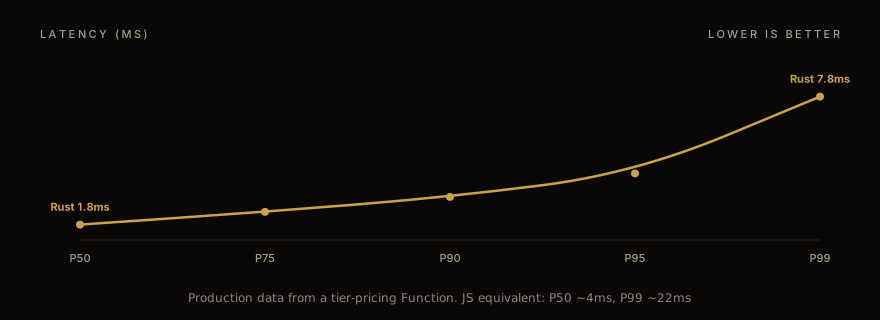
The second is execution speed at P95-P99. Both runtimes execute fast at the median. The tail latency differs. Rust's compiled-ahead-of-time Wasm executes deterministically; JS Functions go through a JIT warmup. We measured P99 latency on a complex tier-pricing Function: Rust at 7.8ms, JavaScript at 22ms. The Function CPU budget is 5ms — if your JS Function is hitting 22ms at P99, it's getting killed and the discount silently fails. Rust gives you headroom there too.
The third is type safety. Discount Function inputs are large GraphQL-shaped JSON objects. The fields are nested, optional, sometimes ambiguously typed (Money values come as strings, dates come as ISO strings, IDs are opaque). JavaScript leaves it up to you to remember which fields are nullable. Rust forces an explicit `Option<T>` everywhere, and the compiler refuses to let you ignore it. We have seen production bugs in JS Functions where a missing currency field crashed the discount silently; we have not seen the equivalent bug in our Rust Functions. The compiler caught them in dev.
The honest counterargument: build complexity. A Rust Function takes 30 seconds to compile (vs 2 seconds for JS). The local toolchain needs `wasm32-unknown-unknown` configured. The CI/CD setup is more involved. For a Function with simple logic that doesn't push the size or latency budgets, JS is the right call.
Project layout
A Rust Function in our typical project structure:
``` discount-bogo/ ├── Cargo.toml ├── src/ │ ├── lib.rs ← entry point │ ├── input.graphql ← Shopify input query │ └── schema.graphql ← Shopify schema (codegen target) ├── shopify.function.extension.toml └── tests/ ├── fixtures/ │ ├── cart-with-bogo.json │ ├── cart-empty.json │ └── ... └── integration.rs ```
The Cargo.toml is the most important file. Three things to get right:
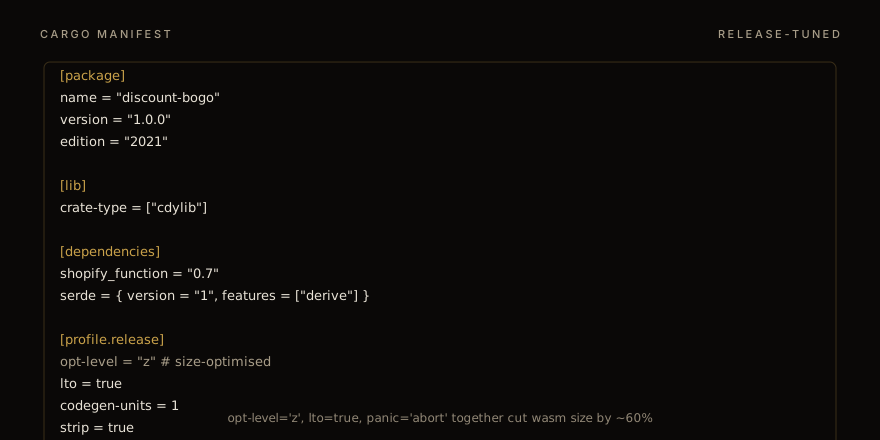
The `crate-type = ["cdylib"]` directive tells Cargo to produce a C-compatible dynamic library — which the wasm32 target then turns into a Wasm module. Without this, Cargo produces a regular Rust library that Shopify can't load.
The release profile flags compound. `opt-level = "z"` optimises for size (vs the default `"3"` which optimises for speed); `lto = true` enables link-time optimisation; `codegen-units = 1` disables parallel code generation in favour of fewer, more aggressive optimisations; `strip = true` removes debug symbols; `panic = "abort"` removes unwinding code from the binary. Together they cut wasm size by ~60% from the basic release build.
The dependencies stay minimal: `shopify_function` (the official crate), `serde` for JSON. Avoid heavy dependencies — every transitive crate adds wasm size. We try to keep the crate count under 15 for a typical Discount Function.
The shopify-function crate
The `shopify_function` crate handles the input deserialization and output serialization. The basic shape:
``` use shopify_function::prelude::*; use shopify_function::Result;
#[shopify_function] fn function(input: input::ResponseData) -> Result<output::FunctionRunResult> { // Your logic here Ok(output::FunctionRunResult { discounts: vec![], discount_application_strategy: output::DiscountApplicationStrategy::FIRST, }) } ```
The `#[shopify_function]` macro generates the Wasm exports Shopify expects. The `input` and `output` modules are generated from your `input.graphql` and `schema.graphql` at build time — they are not types you write by hand.
The codegen step is the part that surprises Rust developers used to typed APIs. You write a GraphQL query in `src/input.graphql`. The `shopify_function` build script runs at compile time, parses the query against the Shopify schema, generates Rust types, and makes them available as `input::ResponseData`. Change the query → regen the types. The compiler then forces you to update your function logic to match.
This is the type-safety win in practice. A new field in the Shopify schema, an old field deprecated, a typo in your query — all caught at compile time, not at deploy time, not in production.
The trap: the schema.graphql file ships with the shopify-function crate and gets updated when Shopify revises the schema. Pinning your `shopify_function` version too aggressively means missing schema updates; floating it too loosely means your CI breaks when Shopify ships a breaking schema change. We pin the major version (`"0.7"`) and run weekly dependency updates.
Local testing harness
The same vitest-vs-CLI tradeoff applies in Rust. The official `shopify app function run` command takes 30+ seconds because it does a clean Wasm rebuild. The fast path is `cargo test` with JSON fixtures.
Our pattern:
``` #[cfg(test)] mod tests { use super::*; use serde_json;
fn load_fixture(name: &str) -> input::ResponseData { let raw = include_str!(concat!("fixtures/", name)); serde_json::from_str(raw).expect("invalid fixture") }
#[test] fn bogo_two_eligible_one_discounted() { let input = load_fixture("cart-with-two-bogos.json"); let result = function(input).unwrap(); assert_eq!(result.discounts.len(), 1); assert_eq!(result.discounts[0].value, "50.00"); } } ```
The `include_str!` macro embeds the JSON fixture at compile time, no filesystem I/O at test runtime. `cargo test` runs in 1-2 seconds for a typical Function.
The fixtures themselves come from one of two places. Either you write them by hand (tedious but precise), or you capture them from a real Function call by logging the input JSON in your dev environment and dumping to a file. We do both — hand-written fixtures for unit-level cases (empty cart, single line, edge values) and captured fixtures for end-to-end smoke tests against representative real carts.
Deploying
`shopify app deploy` is the one-line answer. Behind the scenes:
The Shopify CLI runs `cargo build --release --target=wasm32-unknown-unknown`. The output Wasm goes to `target/wasm32-unknown-unknown/release/discount-bogo.wasm`. The CLI then uploads the Wasm + the metadata to Shopify Functions API, registers the deployment with the merchant's store, and creates the merchant-facing discount that references the Function.
Two operational notes.
The CLI deploys to whichever store is currently the "active" target. If you have multiple development stores, set `app.toml` correctly or you'll deploy to the wrong store. We lost an afternoon to this before realising — the deploy succeeded, but to a stale staging store, while the merchant was watching the production store.
The deploy is atomic per Function but not per app. If your app has three Functions and you deploy after only updating one, the other two redeploy as well. This is normally fine but can cause function execution metrics to reset (Shopify treats it as a new version), which makes performance comparisons noisy. Deploy intentionally.
Wasm size optimisation in detail
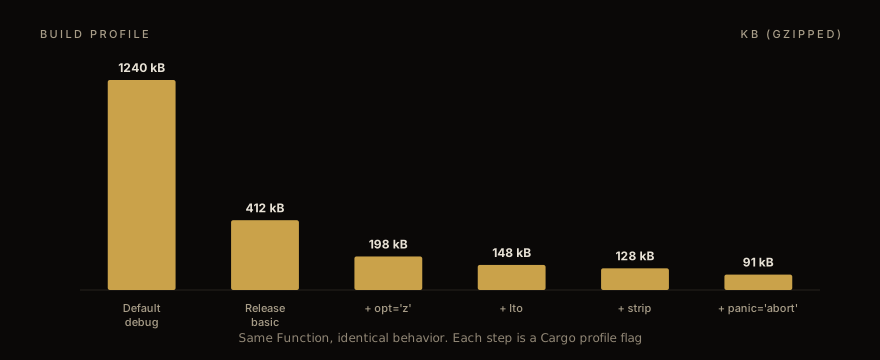
Each optimisation is a single Cargo profile flag and they compound:
The `opt-level = "z"` change is the biggest single drop — from 412kB to 198kB on our reference Function. Rust's "z" optimises ruthlessly for binary size, including inlining decisions, loop unrolling avoidance, and dead-code elimination. The runtime is slightly slower but for Function workloads (5ms budget, simple logic), the speed cost is unmeasurable.
The `lto = true` step adds link-time optimisation. Cross-crate inlining gets aggressive; unused code paths in dependencies get stripped. ~50kB saved on a typical Function.
The `strip = true` step removes the symbol table from the binary. Strictly debugging information; doesn't affect runtime. ~20kB saved.
The `panic = "abort"` step is the surprising one. By default, Rust includes unwinding code that runs when a `panic!()` occurs — the equivalent of stack unwinding for unhandled exceptions. Wasm doesn't really need this, and Shopify Functions can't recover from a panic anyway (the Function execution is terminated and the discount silently fails). Setting `panic = "abort"` removes the unwinding tables entirely. ~37kB saved on our reference, sometimes more.
The `codegen-units = 1` flag is the slowest of the optimisations to compile but produces the smallest output. Default Rust uses parallel codegen with 16 units; setting it to 1 forces single-threaded compilation but enables more aggressive optimisation across the entire crate. Recommended only for release builds; debug builds should stay at the default.
The runtime cost of all this size optimisation: Rust's compiler is slow with `lto + opt-level=z`. A typical clean release build takes 60-90 seconds for our Functions. Incremental builds are much faster (5-10 seconds for typical changes), but CI builds always start clean.
The gotchas nobody documents
Five things that bit us in production and weren't in any tutorial:
The first is `std::time`. Rust's standard library `Instant::now()` and `SystemTime::now()` panic on the wasm32-unknown-unknown target because there's no platform clock. The Shopify Function input includes a `localizedAt` field with the cart's effective time; use that. If you genuinely need wall-clock time for some calculation, you have to take it as input — Wasm without WASI has no way to read a clock.
The second is randomness. `std::random` and most random-number crates panic the same way. The fix is the same — take the seed as input from the Function's metafield configuration, or use a deterministic ID-based hash for "random" selection in your discount logic. Real randomness is not available without WASI preview2 , which Shopify Functions don't currently expose.
The third is the JSON schema mismatch trap. The `shopify_function` codegen produces Rust types from your `input.graphql` query against the Shopify schema. If the query asks for a field that's optional and the cart has a null for that field, the deserialization succeeds with `Option::None`. If the query asks for a field that's NOT in the schema (typo, deprecated field), the codegen warns but doesn't fail — and at runtime, the field is absent from the JSON, your `Option::Some` arm is never reached, and your discount silently fails. Always run `cargo check` after editing input.graphql; the codegen warnings matter.
The fourth is `unsafe` blocks. The `shopify_function` crate uses `unsafe` internally for the Wasm export glue. You should not use `unsafe` in your Function logic. If you find yourself writing `unsafe`, you're solving the wrong problem. Real Discount Functions are pure data transformations; they don't need raw pointer manipulation.
The fifth is observability. Functions don't have stdout. `println!` does nothing. The Shopify Function logs surface in the merchant's admin under Functions → Logs, with a 30-day retention. The pattern: include a `debug_info` field in your output (Shopify allows arbitrary debug strings up to 4KB) with whatever you'd have printed. The merchant admin shows it. Don't ship debug strings to production silently — the wire format is still being sent.
Production observability
Once a Rust Function is deployed, the production observability picture:
Shopify exposes per-Function metrics in the merchant admin under Functions → Performance. CPU time per execution, memory usage, error rate. Useful for catching regressions but you can't query them programmatically (no API exposed).
Function logs surface errors and any `debug_info` you emit. 30-day retention. The pattern we use for production debug: emit a JSON-stringified debug payload only when an unexpected condition is hit (cart with negative pricing, missing customer, schema field unexpectedly null), and parse it out of the logs in our weekly review.
For latency tracking specifically, we wrap the function entry in a custom timer and emit the duration to debug_info on every call. The data is noisy at the per-call level but useful for week-over-week trend analysis.
The "it crashed silently" debug guide for Functions: when the Function's discount doesn't fire and you can't tell why, check three places. (1) Function logs in the admin — any panic shows up here within minutes. (2) The cart's discount array in the order JSON post-purchase — Shopify records which Functions were called and which were rejected. (3) The merchant's discount admin — sometimes the Function is registered but the merchant accidentally disabled the discount. We have hit all three on real production debugging sessions.
For the JavaScript-side companion to this Rust path — when the build complexity of Rust isn't justified — the discount API deep dive covers the same Function patterns from the JS angle. For the B2B-specific patterns that often justify Rust, B2B checkout extensions guide covers the per-account pricing and Net-30 logic that pushes Function complexity past the JS sweet spot.
If you have a Function in JavaScript that's hitting size or latency limits and you want a port to Rust, talk to us . The typical migration is 2-4 weeks for a single Function — most of the time goes to the test fixtures, not the Rust itself. We package this under app development services and ship the running Rust Function plus the vitest-equivalent cargo test suite, so your team can maintain it after handoff.
Work with us
Thinking about your next Shopify project?
We build and migrate Shopify stores for brands that care about performance. If this article sparked something, tell us what you’re working on.
Start a conversation