
Most Magento 2 to Shopify Plus migrations succeed or fail in the first two weeks — well before any cutover. The work that matters is the data map. The work that breaks projects is what gets discovered after the cutover, when the redirect file has already been published and the customer-comms email has already gone out.
This is a guide for engineering leads, technical product managers, and founders who are evaluating the move and want to understand the actual shape of the work before committing. It is neither a sales pitch nor a "how to install Shopify" tutorial. It is the field discipline that separates clean migrations from the ones that bleed orders for six months after launch.
Why merchants are evaluating the move in 2026
Magento Open Source remains an option, but the operational gravity of running it has shifted. Three factors drive the conversation.
First, the licensing arc on Adobe Commerce has steepened. Adobe Commerce Cloud minimums climbed through 2024 and 2025, and the renewal calculus increasingly looks worse than the alternative. Even merchants on Open Source are seeing the maintenance bill — security patching, EAV-attribute tuning, PHP and Composer compatibility — climb past what a managed platform delivers.
Second, the hosting and uptime burden is its own line item. Every team running Magento at scale has either an in-house infrastructure engineer or a managed-Magento contract, and both are expensive. Shopify Plus shifts that line item to a flat platform fee with engineered uptime guarantees, which is sometimes cheaper than the people-cost of the alternative.
Third, the mobile checkout conversion gap has widened. Shopify's checkout receives engineering investment that most self-hosted Magento installs cannot keep pace with — Shop Pay, one-page checkout, accelerated payment methods, and the dozens of small tweaks that compound. For merchants where mobile is more than half of revenue, the conversion delta alone can pay for the migration.
If you are evaluating the move at the strategy level, our migration overview page walks the why and the what; this post is the how.
The pre-migration audit — what to inventory before any code runs
The single most expensive mistake teams make is skipping the audit. Migrations that get straight into ETL scripting always discover blockers in the cutover window, when there is no time to negotiate.
A serious pre-migration audit produces five inventories.
1. URL inventory
Every URL the search engines know about needs a redirect target. Pull the last 18 months of Google Search Console indexed pages, the live sitemap, the analytics top-1000 by traffic, and (critically) the long tail from server logs. The long tail is where surprise live URLs hide — old campaign pages, blog posts a marketer published once and forgot about, syndicated feeds with their own slugs.
2. Customer account inventory
How many active accounts are there? How many have wishlists, store credit, or saved addresses? How many have logged in in the last 12 months? These three counts drive the customer-comms strategy and the password-reset UX decision later in the project.
3. Order history inventory
Total orders ever, orders in the last 24 months, orders in the last 7 days. Shopify Plus accepts historical order import via CSV, but the format is opinionated and the line-item mapping is non-trivial. The 7-day count matters most because it is the orders that will be in flight during cutover.
4. Magento extension inventory
Every extension installed, with a column for "what does this actually do for us?" Extensions whose answers are vague or "we are not sure" are candidates for retirement, not replacement. The ones with sharp answers fall into three buckets: native Shopify equivalent, Shopify app replacement, or custom build (a Function or app extension).
5. Custom code inventory
Anything in app/code/local, custom modules, custom theme overrides. This is where the genuine risk lives. Custom checkout logic in particular tends to encode business rules nobody wrote down, and recreating those rules in Shopify means first surfacing them.
The audit usually takes one to two weeks for a mid-sized catalog. Skipping it saves nothing because the time still gets spent — it just gets spent in production after launch instead of on staging before.
The data map — the document everything depends on
Once the audit is in, the data map is the next deliverable. It is a spreadsheet, not code. Build it in code and you will rewrite it three times.
Each row is a Magento field; each column is the Shopify destination. For a typical catalog the rows include catalog product entity to Products (direct mapping for SKU, name, description, weight, dimensions, status, with EAV attributes flowing into Shopify metafields), configurable products to Variants (option sets reconciled mechanically), categories to collections (rule-based or curated, decision per category), tax classes (no direct equivalent — tax handling moves to Shopify Tax or a third-party service), customers to Customers (direct except for passwords and store credit), and orders to Orders (flat structure with line items, addresses, fulfillment, payment status).
The fields that consistently surprise teams: per-store-view overrides for B2B catalogs, configurable product attribute scopes, custom customer attributes, and tax-class hierarchies. None of these are unmappable. All of them need to be discovered before code, not during.
Redirects — the SEO equity preservation pattern
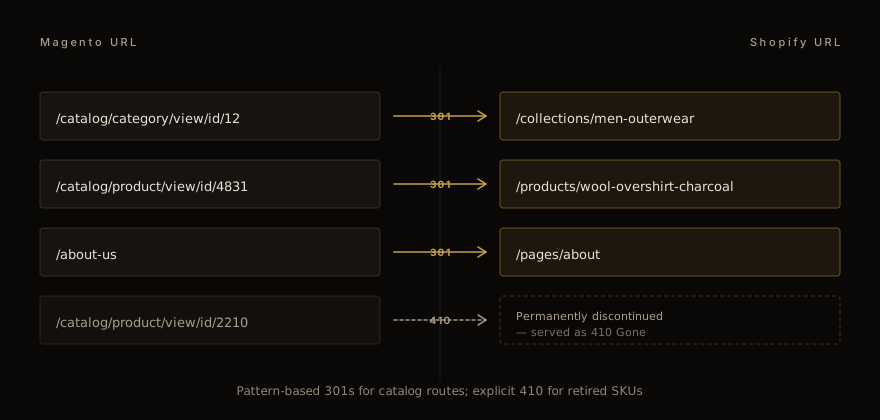
The redirect map is where 18 months of organic equity either survives or gets surrendered. The pattern has three rules.
Rule 1: 301 every URL in the existing index. Permanent redirect tells search engines to transfer the equity. 302 (temporary) leaks equity. The Magento to Shopify path always uses 301.
Rule 2: pattern-based for catalog routes; row-by-row for everything else. Magento's /catalog/category/view/id/N and /catalog/product/view/id/N patterns are deterministic and should be redirected via pattern rules in Shopify's URL redirects table — one rule covering thousands of routes. CMS pages, blog posts, and one-off campaign URLs are individual lines.
Rule 3: 410 for SKUs that will not exist on the new site. Discontinued products are not 301'd to a generic category page — that is a soft-404 in disguise and crawlers eventually deindex everything pointed at it. Serve a clean 410 Gone instead. The redirect file makes the intent explicit; no equity is lost because none of those URLs were ranking for valuable terms anymore.
A few less-discussed details that matter.
Query strings. Magento's faceted-navigation URLs frequently carry params. Decide upfront whether each param is canonical or noise; redirect with the param stripped if it is noise, with the param preserved (mapped to Shopify equivalents) if it is canonical.
Trailing slashes. Pick a convention and enforce it. Inconsistency creates duplicate-content signals.
www vs apex. Pick one as canonical, redirect the other, and confirm Shopify's primary domain matches your choice before DNS cutover.
Submit the new sitemap to Google Search Console the day of cutover. Do not wait. The faster the new sitemap is in front of crawlers, the shorter the recovery curve.
We covered the cross-platform pattern in detail in our companion guide on WooCommerce to Shopify SEO preservation ; the redirect philosophy is platform-agnostic.
Customer accounts — the encrypted password problem
Customer accounts are the migration step where it becomes obvious that a 1-to-1 data port is not possible.
Magento stores customer passwords as bcrypt hashes (with the platform's specific salt and cost factor). Shopify's customer authentication uses a different hashing scheme. The two hashes are not interoperable — there is no script that "translates" one to the other, and there should not be, because that would require knowing the plaintext password.
The only correct path is to force a password reset on first login post-cutover. The UX pattern is well established.
Pre-cutover: import customer records (email, name, addresses, tags, marketing consent) but mark every account as needing a password reset. Day-of cutover: when a returning customer hits the login page, the form recognizes their email and routes them to a password-reset flow rather than a failed-login error. Communication: send a clear, branded "we have upgraded our store and you will need to set a new password on your next visit" email a week before cutover. Send it again the day of cutover. The "why" matters; people ignore generic password-reset prompts.
Teams that skip the email comms end up with confused returning customers, support ticket spikes, and a measurable conversion dent for two to four weeks. Teams that handle the comms cleanly minimize the disruption.
Storefront — what Liquid replaces and what it does not
Once data is mapped and customers are handled, the visible work begins: rebuilding the storefront in Liquid. Three categories of work, in order of difficulty.
Easy: standard merchandising surfaces. Product listing pages, product detail pages, cart, simple navigation. These have direct Liquid equivalents. A theme partner who has done the work before delivers these in days, not weeks.
Medium: customizations that mapped to Magento Layout XML. Custom block placements, conditional content per category, A/B-tested layouts. Shopify's section-based theme architecture handles all of this, but it takes deliberate planning — sections and blocks need to be designed around the merchandiser's actual workflow, not just the engineering surface.
Hard: custom checkout and discount logic. Magento's app/code/local checkout customizations frequently encode business rules that nobody wrote down. The honest path is to surface those rules — sometimes by sitting with the operations team for a day — and rebuild them as Shopify Functions where they fit, or as Shopify apps where they do not.
This is the part of the migration that costs the most and saves the most. Done well, the new checkout is faster, more conversion-friendly, and more maintainable than what it replaced. Done badly, it is a six-month bug-fix tail.
For teams interested in how custom discount logic translates, our Shopify Functions Discount API guide walks the BOGO, tiered-pricing, and bundle patterns.
The cutover window
The cutover itself is the boring part — if everything before it was done right.
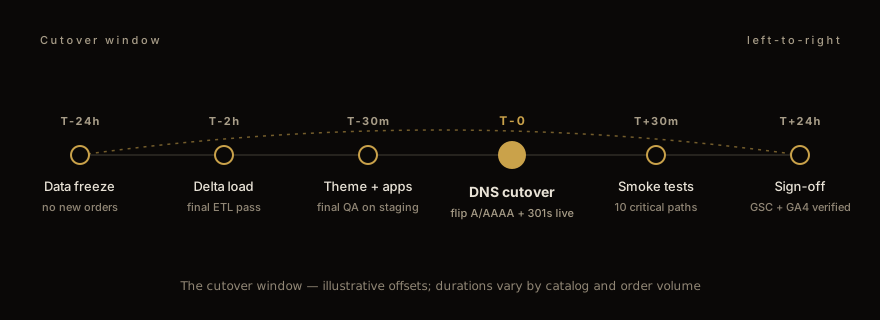
The shape of a typical cutover, with example offsets: T-24h, data freeze (stop accepting new orders on Magento; product changes pause; the catalog and customer data are stable for the final ETL pass). T-2h, final delta load (run the last incremental import to capture orders and customer changes from the freeze window). T-30m, theme and apps final QA on staging (merchandising preview, accessibility check, mobile smoke test). T-0, DNS cutover (flip the A and AAAA records to Shopify, activate the URL redirect file, confirm SSL). T+30m, smoke tests on production (walk the ten most critical paths: home, category, product, add-to-cart, checkout, order confirmation, plus the top three traffic-driver paths from analytics). T+24h, sign-off (submit the sitemap to Google Search Console, confirm GA4 is receiving traffic, acknowledge the launch).
The "ten critical paths" smoke-test list is non-negotiable. Teams that compress it lose orders to bugs that surface in week one but should have been caught in the first hour.
After launch — the 30-day SEO recovery curve
Search rankings dip after any platform migration. This is normal, expected, and recoverable. Plan for it; do not be surprised by it.
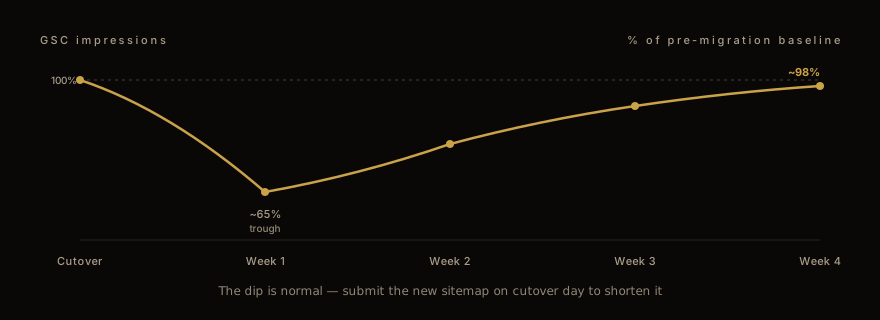
The shape of the curve: in week 1, GSC impressions drop as crawlers discover the new structure and re-evaluate. The dip is normal — submit the new sitemap immediately on cutover day to shorten it. In week 2, redirect chains finish propagating; impressions begin recovering. Through weeks 3 and 4, organic rankings stabilize, often within a few percentage points of pre-migration baseline if redirects were comprehensive. By day 30, if rankings have not recovered to baseline, the redirect map has gaps. Audit the GSC "404 not found" report against the original URL inventory and fill the misses.
The watch-list of metrics for the post-launch period: GSC impressions, GSC clicks, organic conversion rate, returning-customer login rate, and page-speed (LCP, CLS, INP) on the top 20 pages by traffic.
When to bring in help
A determined in-house team can run a Magento to Shopify Plus migration without a partner. It is not magic; it is discipline.
The places teams genuinely benefit from outside help are the data map (where someone with prior migration scars sees the EAV-attribute and tax-class traps before they fire), the redirect strategy (where pattern-based rules and the 410-vs-301 decisions need experience to call quickly), and the Function or app rebuild for custom checkout logic (where the rebuild approach drives months of subsequent maintenance cost).
If your migration is small (catalog under 1,000 SKUs, customer base under 10,000, no custom checkout logic) it is reasonable to run it in-house. If any of those scales is bigger, the cost of getting the migration wrong starts to exceed the cost of doing it right.
We do this work for a living. The full Magento-to-Shopify-Plus walkthrough — scope, timeline, what we own and what stays with your team — is at our migration landing page . If you want to talk through your specific catalog, get in touch and we will set up a working session.
Closing
A clean Magento to Shopify Plus migration looks easy in retrospect: data flowed, redirects held, customers reauthenticated, rankings recovered. That ease is the output of careful auditing, deliberate sequencing, and a willingness to delete what was not working before importing it into the new platform.
The migration is the chance to do the cleanup that the old store kept deferring. Read more on the migration services overview or browse our other posts for cross-platform patterns and storefront-engineering deep dives.
Work with us
Thinking about your next Shopify project?
We build and migrate Shopify stores for brands that care about performance. If this article sparked something, tell us what you’re working on.
Start a conversation