
Shopify Script Editor died on August 28, 2025. If you were running discount logic on Plus through Scripts — BOGO, tiered pricing, custom bundles, gift-with-purchase — you migrated, you're migrating now, or you're discovering at checkout that your discounts stopped working. Functions is the replacement, it has been the replacement since 2022, and the migration deadline pushed twice before sticking.
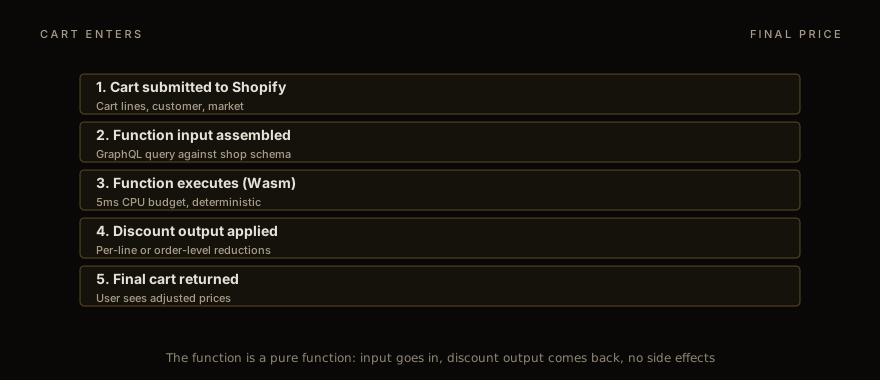
Functions are not a one-to-one replacement. The architecture is fundamentally different — sandboxed Wasm running on Shopify's infrastructure, called per-request, with a strict input/output contract. The capabilities are broader. The traps are different. We have shipped 20+ Discount Functions in production over the last two years; this is the deep dive on what they actually do, where the bugs live, and how to test them so they don't break in production.
Why Script Editor died and what replaced it
Script Editor was a Ruby DSL that ran on Shopify's servers as part of the checkout pipeline. It worked — for years — but it had two structural problems that Functions solves.
The first was version control. Scripts lived in the Shopify admin UI as text fields with a basic editor. There was no git integration, no review workflow, no rollback beyond manual copy-paste. Production stores running real money through Scripts had no audit trail beyond Shopify's internal change log.
The second was performance and scaling. Scripts ran on Shopify's shared Ruby infrastructure with no per-merchant isolation. A misbehaving Script (an infinite loop, a runaway condition) could degrade the cart-load time for the merchant's checkout. There was a 250ms wall-time budget but the granularity of monitoring was poor.
Functions solve both. Functions are deployed via the Shopify CLI (or a custom CI pipeline) from a git repository. They compile to WebAssembly and run in a per-merchant sandbox. The wall-time budget is 5ms CPU and 11MB memory — strict enough that bugs surface in development, not production. The deployment artifact is the .wasm binary plus a JSON metadata file, both versioned together.
Migration from Scripts to Functions is mostly mechanical: identify each Script, document its logic, and rebuild the equivalent in JavaScript or Rust. We have a Script Editor migration KB entry that walks through the most common Script patterns and their Functions equivalents.
Discount Function vs automatic discount vs price rule
Three discount mechanisms exist on Shopify Plus, and choosing the wrong one wastes weeks.
Automatic discounts are configured in the Shopify admin. They take a fixed shape — percentage off, fixed amount off, free shipping, BOGO with the specific Shopify-defined "Buy X get Y" template — and apply automatically when the cart matches the rule. Use these when the discount logic fits the templates. They cost zero engineering effort and they integrate cleanly with Shopify's reporting.
Price rules are the older API for the same thing. Some apps still use them. Newer apps and merchants should use automatic discounts via the Admin GraphQL API; price rules are slated for deprecation but no firm date.
Discount Functions are the escape hatch. Use these when the logic doesn't fit a template. Custom BOGO with complex eligibility (only on certain collections, only above a cart threshold, only for specific customer tags). Tiered pricing where the discount changes by line quantity. Bundle logic with mix-and-match items. Spend-X-get-Y with multiple gift options. The Functions API gives you arbitrary logic — at the cost of having to write, test, and maintain the code.
The decision rule we use: if it fits an automatic discount template, use that. If it doesn't, write a Function. Don't try to bend the templates with creative naming and hope it works — it won't.
The Function input/output contract
Every Discount Function gets the same shape of input. A GraphQL query against the cart, customer, and shop context. The query is defined in your Function project (in `src/run.graphql`), and Shopify expands it into a JSON object passed to your Wasm binary at runtime.
The output is also a fixed shape. A `FunctionRunResult` containing a `discounts` array (each entry specifying a discount target and a value) and a `discountApplicationStrategy` indicating how multiple discounts compose. The shape is documented in Discount Function reference .
The trap is in the input. The Function input is whatever your GraphQL query asks for. Forget to query a field, and your function can't see it. Query a field that's deprecated, and your function fails to compile. The Shopify CLI catches schema mismatches at deploy time, but not at runtime — meaning an input field that's null because the cart has an empty value behaves differently from an input field that's null because you didn't query it.
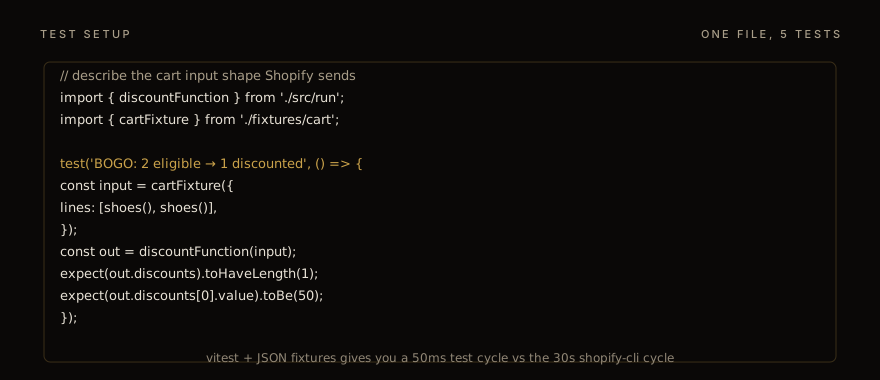
Best practice: write fixture cart inputs in your test suite that exercise the empty/null/missing cases. We use a vitest harness that loads JSON fixtures and asserts on the function's output for each case. A typical Function has 8-15 fixture cases by the time it ships.
BOGO: the obvious approach + 3 traps
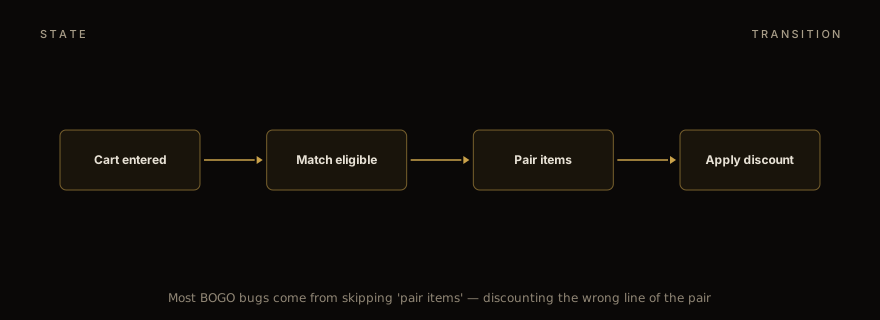
"Buy one, get one free" sounds trivial. The naive implementation: if the cart has 2+ of the eligible product, apply a 100% discount to one of them. This breaks in three predictable ways.
The first trap is pricing inheritance across variants. If the eligible product has variants at different prices ($30 small, $50 large), and the cart has one small and one large, which one gets the discount? The fairness instinct says "the cheaper one" so the customer gets the better deal. Shopify's automatic-BOGO logic actually defaults to the LATER line in the cart, regardless of price — which can mean discounting the more expensive item if the customer added it second. The Function has to make an explicit choice. We always default to discounting the cheaper line; merchants always confirm this when asked.
The second trap is eligible-quantity counting. If the rule is "buy 2, get 1 free" (a BOGO on quantity 3), and the cart has 5 of the product, what's the right answer? The customer expects "buy 4, get 2 free" — two BOGO pairs, with one item at full price. The naive code applies the discount to one item and stops. The correct code computes `floor(qty / 3) * (discount * qty_per_pair)`. This is the most common BOGO bug we see in production: the discount applies once even when the cart qualifies for multiple instances.
The third trap is discount stacking with other discounts. If the customer has a 10% off code applied AND the BOGO triggers AND the customer is on a B2B price list, what's the order? Shopify's `discountApplicationStrategy` controls this, and the default `FIRST` (apply discounts in order, stop after the first match) is rarely what merchants want. `MAXIMUM` applies the best single discount per line. Some merchants want stacking (`ALL`), which Shopify supports via the `combinations` field on the discount node. Get this wrong and customers either get less than promised (bad PR) or more than promised (margin disaster).
Tiered pricing: per-line vs per-cart
Volume discounts come in two flavours that look the same to merchants but behave differently in code.
Per-line tiered pricing applies the discount to each line based on the line's own quantity. "10% off when you buy 5+ of any single SKU" is a per-line rule. The Function iterates lines, checks each line's quantity, applies the tier if hit. Easy.
Per-cart tiered pricing applies based on the total cart quantity or value. "10% off when your cart has 10+ items total, regardless of SKU" is a per-cart rule. The Function aggregates first, then applies the discount across all eligible lines. Trickier — the discount target is "all lines" not "this line", and the value distribution across lines matters for line-level reporting.
The trap with per-cart is the discount value. If the rule is "10% off the cart" and the cart total is $100, the discount value is $10. But applied to which lines, in what proportion? Shopify's default is to distribute the discount proportionally across lines by value. The Function has to either accept this or override it with explicit per-line targets.
For most B2B pricing, per-line is the right model — the volume threshold is per-SKU because the merchant cares about moving inventory of specific items. For most consumer promotions, per-cart is the right model. The merchant always says "tiered pricing" without specifying which; the Function author has to ask.
Bundle logic and mix-and-match
Bundles get their own bullet points because they have three sub-patterns.
Fixed bundles: "buy items A + B + C together for $X". The Function checks if all three are in the cart with quantity ≥ 1, computes the bundle price, and emits a discount equal to (sum of line prices) − (bundle price). Easy.
Mix-and-match: "any 3 items from collection X for $Y". The Function counts qualifying items, groups them into 3-packs, applies the bundle price to each pack. The leftover (cart has 7 qualifying items → 2 packs of 3 + 1 leftover at full price) needs explicit handling.
Build-your-own: "configure a 6-pack from these 12 options". This is structurally similar to mix-and-match but the logic depends on whether the customer can include duplicates. Most BYO bundles allow duplicates (3 of one variant + 3 of another); some don't. Always ask.
The bundle gotcha across all three patterns: inventory accounting. A bundle that sells 3 separate SKUs as a unit needs to deplete inventory of all three. Shopify Functions don't directly modify inventory — that happens through the order pipeline — but the cart-level discount has to match the inventory commitment that fulfilment expects. Coordinate with the fulfilment team early. We have seen bundles ship with the wrong line composition because the discount logic and the fulfilment logic were built by different teams.
Composing discounts: the cap pattern
Real-world discount logic often involves multiple discounts that should compose carefully. A 10% loyalty discount should compose with a one-time promo code; a BOGO should not double-dip with a percentage-off discount on the same items.
The Shopify pattern for this is `combinations.OR` — a discount declares which other discount classes it can combine with. Set the combination rules at the discount level, not the function level. Shopify's discount engine handles the actual composition.
The cap pattern is what we apply on top: a max-discount-per-line cap to prevent compounding bugs. If the loyalty discount, BOGO, and price list combine to discount a line more than the line's price, the line price goes negative and Shopify rejects the cart. The cap pattern asserts a max-discount-percentage at the function level. We typically set 80% as the max; merchants can override per-product if they want to allow 100%-off scenarios.
Testing: vitest + fixtures
The Shopify CLI provides a `shopify app function run` command that executes your function against a JSON input file. Useful for smoke testing. Painfully slow for iteration: 30+ seconds per run because the CLI does a clean Wasm compile each time.
Our actual workflow is vitest. The Function's `run` function (the entry point) is exported as a pure JS function. The vitest harness imports it directly, calls it with cart fixtures, and asserts on the output. 50ms per test, hundreds per second, full debugger support. The Wasm compilation is only relevant at deploy time, not during development.
A typical Function has these vitest test groups:
Eligibility: cart matches rule → discount fires; cart doesn't match → no discount.
Quantity logic: BOGO on 2 items → 1 discount; BOGO on 5 items → 2 discounts (with 1 leftover); BOGO on 0 items → no discount.
Edge cases: empty cart, single line, deleted product, customer not logged in, B2B price list active.
Combination rules: with another discount active → composes correctly; with conflicting discount → declines per combination rules.
Numeric precision: all discount values are integers (cents); never round mid-calculation; assert exact values, not approximate.
The fifth — numeric precision — is the bug that survives migration most often. JavaScript number arithmetic produces floats; Shopify's discount values must be integers. Multiply prices by 100 at the start, do the math in cents, divide at the end. Or use a decimal library. Either way, never `.toFixed(2)` your way out of a rounding error.
Deployment and merchant configuration
Deploying a Function: `shopify app deploy`. The CLI compiles the Wasm, uploads the metadata, registers the function with Shopify Functions API, and creates a discount in the merchant's admin that references the deployed function.
Merchant-facing configuration is the underrated part. The discount in the admin needs a UI for the merchant to configure variables — eligibility thresholds, tier breakpoints, gift options. The Function reads these from `discount.metafield` queries. Build the metafield UI in your app (typically a Polaris React component on a dedicated app page), validate inputs there, and let the Function trust the metafield values.
The trap is metafield namespacing. Your Function reads `app--my-app.discount-config`. If the merchant has multiple discount Functions installed, they all need different namespaces. Conflicts produce silent failures: the function reads a config from the wrong app, and the discount fires (or doesn't) in unexpected ways.
For the language choice — JavaScript or Rust — the Rust Functions tutorial covers when Rust pays off. Most Discount Functions are simple enough that JS is the right choice; the rare cases where the function gets complex (heavy iteration over cart lines, intricate combination logic) benefit from Rust's performance ceiling. The output format is identical either way.
For the B2B-specific patterns built on top of Discount Functions, see the B2B checkout extensions guide . Per-account pricing, Net-30 terms, and PO field validation interact with the discount layer in ways the consumer-side discount logic doesn't.
If you're staring at a Script Editor migration and need help scoping the Functions rebuild, talk to us . We have done these for merchants with 1-3 simple Scripts (typically 2-3 weeks of work) and merchants with 15+ Scripts encoding complex B2B pricing rules (4-6 month projects). The discovery is the same regardless: enumerate the Scripts, document the behaviour, prioritise by revenue dependency, build and test in vitest, deploy in batches. The full engagement scope sits under app development services .
Work with us
Thinking about your next Shopify project?
We build and migrate Shopify stores for brands that care about performance. If this article sparked something, tell us what you’re working on.
Start a conversation