B2B on Shopify Plus is no longer the second-class citizen it used to be. The 2024 launch of native B2B (built on the same Plus infrastructure as DTC, not as a bolted-on app), the Aug 2024 sunset of `checkout.liquid`, and the maturation of checkout UI extensions and Functions together produced a stack that can do real B2B: per-account pricing, Net-30 terms, PO numbers, multi-location ordering, custom shipping logic, approval workflows. The pieces are there.
The pieces don't assemble themselves. We have shipped twelve B2B builds on Plus over the last 18 months, and every one of them ran into the same set of decisions and the same set of traps. This is the field guide for that work.
Why checkout extensibility replaced checkout.liquid
Until August 2024, B2B customisation on Plus was done through `checkout.liquid` — the original Liquid-templated checkout file that Plus merchants could edit directly. It was flexible, dangerous, and increasingly incompatible with Shop Pay, Apple Pay, and the modern payment-method auto-negotiation that Shopify shipped in 2023.
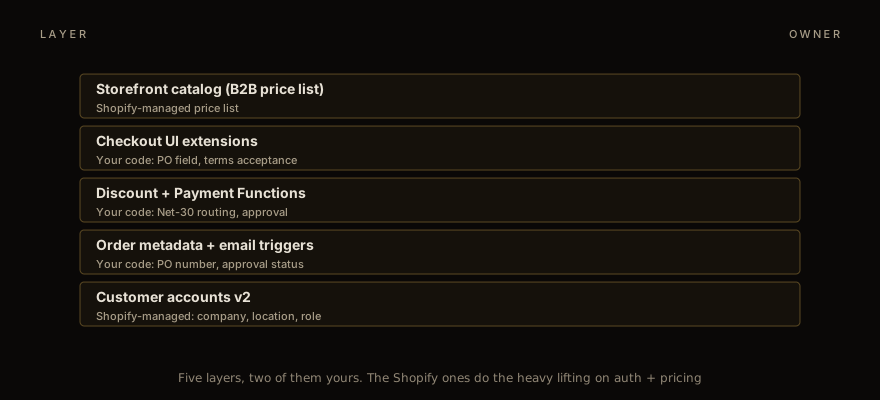
The replacement is a stack of three things, and you need all three to do real B2B.
checkout extensibility reference — the new UI primitive. Block-Kit-style React components that render in the Shopify-hosted checkout. Limited surface area (you can add fields, banners, and buttons in pre-defined slots) but consistent behaviour across payment methods.
Shopify Functions — for any business logic that needs to compute a result. Discount calculation, payment routing, shipping rate selection, validation. Functions run in a Wasm sandbox with a 5ms CPU budget. Same primitives we cover in the discount API deep dive and Rust Functions tutorial , applied to B2B-specific problems.
customer accounts v2 — the new account-layer that exposes company, location, and role to checkout extensions and Functions. The old Customer model was DTC-shaped (one user, one address book); v2 models the B2B reality (companies have multiple locations, locations have multiple buyers, buyers have roles like "approver" or "purchaser").
If you're starting a new B2B build in 2026, you use all three. If you're migrating from a `checkout.liquid` build, you're rewriting it. The forced migration is the source of most B2B Plus engagements right now.
B2B catalog vs storefront catalog
A Plus store running both DTC and B2B has two catalog perspectives that need to coexist. Same products, different pricing, different visibility, different shipping, sometimes different payment methods.
Shopify's primitive for this is the price list. A price list is a set of pricing overrides scoped to a market or a customer/company. Each customer can be assigned to one or more price lists; the lowest applicable price wins (with explicit overrides via metafields if you need bespoke logic).
The trap is scope hierarchy. Price lists apply in a defined order: market currency → market price list → customer price list → company price list → variant-level overrides. If a customer is in a market that has its own price list AND on a company that has its own price list, both apply, and the lower wins by default. We have seen merchants accidentally undercut their own B2B pricing because the market-level "all customers in Germany pay -10%" rule applied on top of the company-level "Acme Co pays -15%" rule, producing a 25% discount neither was intended.
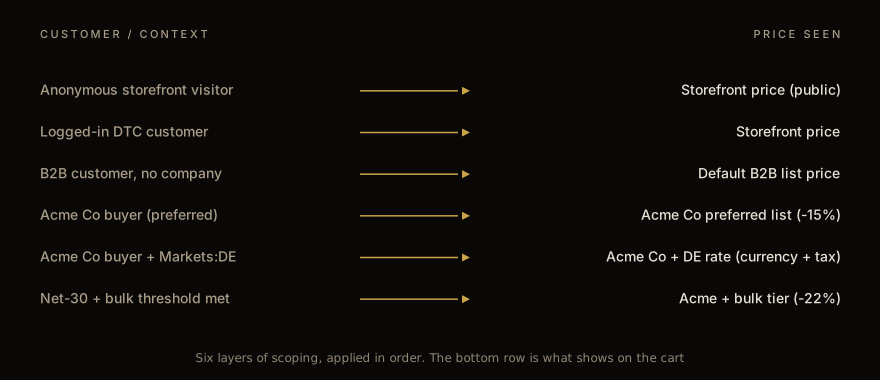
The fix is explicit `combinations` declarations on each price list, telling Shopify whether the list stacks with others. Default to NOT stacking (combinations = []) and add explicit stacking only where the merchant truly wants compounding. Document which lists stack in a runbook so the next person editing pricing doesn't undo the rule by toggling a checkbox in the admin.
Inventory is the other coexistence question. B2B customers often want to order from a specific warehouse — "ship from our preferred coast for fast delivery" — while DTC inventory pulls from any-available. Shopify's location-based inventory plus the Markets routing capability handles this, but it requires explicit shipping zone setup per company. We typically build a small admin tool that lets the merchant assign companies to preferred locations, write the location ID to a company metafield, and have a Shipping Function read it at checkout.
Net-30 terms
The most-requested feature in every B2B engagement: "we want to bill our biggest customers Net-30 instead of capturing payment up front."
Shopify B2B supports this natively as the "Pay by invoice" payment method. Enable it in admin → B2B → Payment terms, configure which companies are eligible, and offer it as a checkout option. The order is created with `paymentTerms` of net-30 type; the order's financial status remains "pending" until the merchant manually marks it paid (or you wire it up to your accounting system via webhooks).
The trap is the approval workflow. Most B2B merchants don't want to give every buyer in every company unlimited Net-30 — they want a credit-limit check, an approver review for large orders, and a paper trail. Shopify's native Net-30 doesn't do any of that. You build it.
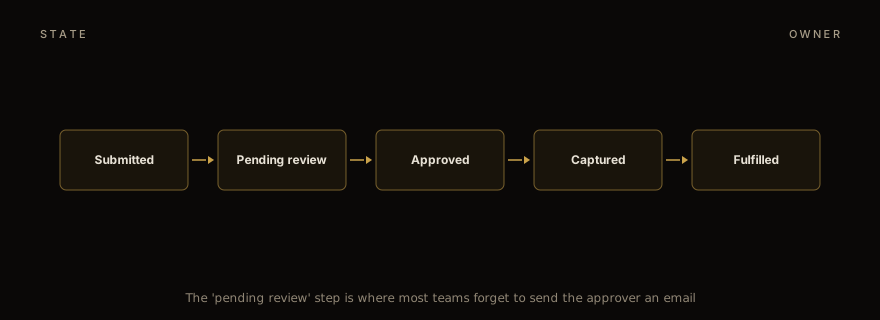
The pattern we use: order submitted → automatically tagged based on order value + company credit limit. Orders under threshold and within credit go straight to approved (financial status moves to authorized but not captured, marker tag added). Orders over threshold go to pending-review (custom tag, email sent to the company's approver), and the order is held until manual approval through a custom admin page (we ship a small Polaris React app for this — typically 3-4 days of work). Approved orders get the tag flipped, the email sent to fulfilment, and Shopify's standard order pipeline kicks in.
The pending-review email is the part teams forget. The approver doesn't have a Shopify admin login — they're an internal procurement person at the customer's company. The email needs a magic-link that opens a hosted approval page (you build this; sits at /approve-order/{token}). The token is signed and time-bounded. Approval click writes to the order metafield, captures payment authorization, and emails the buyer to confirm.
Capture happens 30 days after approval (a scheduled Function or a backend cron — we usually use a Cloudflare Worker on a schedule). Failed captures (card declined, account closed) need a re-prompt to the approver. This is also a footgun — every B2B build we've shipped has needed at least one revision to handle the "card on file expired between order and capture" case.
PO numbers and custom checkout fields
Purchase Order numbers are the single most universal B2B requirement and the most boring to implement, which is why teams skip steps and end up with bad data.
The straightforward implementation: add a checkout UI extension that renders a text input above the payment section, validates that the PO number matches the company's expected format (we support custom regex per-company, written in a metafield), and writes it to a custom field on the order.
The trap is downstream. The PO number needs to flow into the merchant's invoicing system, the order confirmation email, the shipping label (some procurement systems require it on the receiving paperwork), and the company's accounting export. If you write it to a single field, you have to surface that field in five places. If you write it to a metafield with a known shape, every consumer can read the metafield without needing to know about your specific setup.
We standardize on `app--{your-app-id}.po-number` as a metafield namespace. Email templates read from it via Liquid; shipping label includes it via the same; the accounting export script reads it via Admin GraphQL. One source of truth.
The validation logic varies by industry. Government procurement POs follow strict formats (NIH grants are NN-NNNNN; State of California is CALIFORNIA-2026-NNNNNN). Corporate procurement is usually freeform. Don't hardcode a single regex — make it per-company configurable. We expose the regex in the company-management page of our custom admin app; the procurement person at the merchant configures it once per customer at onboarding.
The other custom-field requests we've shipped: cost center, project code, end-user name (for office supplies billed centrally but used by individuals), delivery instructions specific to receiving docks. All follow the same pattern: extension renders the field, validates per company config, writes to a known metafield.
Per-company pricing without breaking SEO
The pricing question that always comes up: "we don't want our public storefront to show our B2B pricing." Reasonable. The implementation has a subtle SEO trap.
The naive approach: hide the price block on the storefront when the customer isn't logged into a B2B account. Show "Login for pricing" instead. The problem: Google's crawler isn't logged in, so the indexed price for every product is "Login for pricing", which kills Product schema's `price` field, which kills the rich-result eligibility for the entire storefront.
The right approach: show the public DTC price on the storefront (this is the price Google indexes and the Product schema reports), and override the price at checkout for B2B customers via the price list. The storefront page render shows DTC pricing; the cart and checkout show B2B pricing because the price list applies after the customer logs in. SEO stays intact.
If the merchant genuinely doesn't want public pricing visible (some B2B-only stores), you set the storefront to require login (Shopify's "Password protect" feature), and accept that you're not getting indexed. That's a different business model.
Hreflang is the other SEO consideration. If the B2B catalog and DTC catalog are on the same Plus store but the merchant operates in multiple markets, hreflang tags on the product page need to declare the relationships between locale variants. Shopify generates these automatically when you use Markets and the localized URL structure (/en, /de, /fr). Don't override them in the theme.
Custom shipping logic
B2B shipping is rarely "calculate the carrier rate and pass it through." Three patterns dominate.
Per-company flat rate. The merchant has negotiated $50 freight to Acme Co regardless of order weight. Implement as a Shipping Function that reads the company metafield, returns the flat rate.
Free shipping above a company-specific threshold. The merchant offers free shipping to top-tier customers above $5,000 cart total. Implement as a Shipping Function reading the company tier metafield, comparing to cart subtotal, returning free if matched.
Carrier integration with custom routing. The merchant has a freight carrier integration (FedEx Freight, R+L Carriers) and wants the rate computed by the carrier with a per-company multiplier. Implement as a Shipping Function that calls the carrier's rate API (within the 5ms function budget — you may need to pre-compute or cache), applies the multiplier, returns the result.
The carrier call within Function time budgets is where teams get stuck. Functions can't do unbounded HTTP fetches; the 5ms budget rules out most external API calls. The pattern that works: cache rate quotes from the carrier in a metafield refreshed by a separate background Worker, and have the Function read the cached rate. The Worker calls the carrier API on a schedule (every 30 minutes for most accounts, faster for high-frequency shippers). Function returns the cached rate plus the company multiplier. Total Function execution: ~1ms.
When NOT to use checkout extensions
Three categories of B2B requirement that look like they want checkout extensions but actually need something different.
Multi-step approval workflows with complex state. Anything beyond "one approver per company over threshold X" — for example, three-tier approval where an order needs supervisor sign-off then VP sign-off then procurement validation — should be a separate workflow tool, not a checkout extension. The order gets created in a "pending external approval" state via the API, lives outside Shopify until approved, then gets pushed back to Shopify with the approval signature. Build this in your existing ERP or a custom tool, not in Shopify.
Quote-to-order flows. B2B customers often want a formal quote (PDF, signed by both sides) before placing the order. Quote-tooling is its own category — Shopify's native draft orders can do simple quotes, but anything with line-by-line customer comments, conditional pricing, or multi-revision negotiation is better handled in a tool like DealHub, Salesforce CPQ, or PandaDoc, with the final accepted quote pushed to Shopify as a completed order.
Heavy Inventory commitment. Some B2B customers want to "reserve" inventory for a period before formally placing the order. Shopify's checkout doesn't have a hold-without-purchase primitive; the inventory commits at order placement. If your merchant needs reservations (build-to-order, configured products with material allocation), build it in a separate inventory tool and have Shopify just record the final order.
The pattern across all three: don't bend Shopify into doing things it isn't designed for. Use it for the parts it's good at (catalog, checkout, payment, fulfilment), and integrate from outside for the rest.
What an actual engagement looks like
Twelve B2B Plus builds, and the shape of the work is consistent enough to scope:
Discovery — 2 weeks. Document the merchant's current B2B operations, the price list structure, the company onboarding flow, the approval policies, the custom field requirements. The output is a written spec the merchant signs off on. This is where most surprises surface.
Phase 1: catalog + price lists — 2 weeks. Configure price lists, set up companies + locations + buyers in customer accounts v2, migrate existing B2B customers if any. No code yet — this is admin configuration.
Phase 2: checkout UI extensions — 3 weeks. PO field, approval banner, terms acceptance, custom shipping notes. The React work and the metafield write paths.
Phase 3: Functions — 3 weeks. Discount logic, Net-30 routing, Shipping Function. The most code-heavy phase. We typically write these in JavaScript unless the logic is complex enough to justify Rust (see Rust Functions tutorial ).
Phase 4: admin tools — 2 weeks. The custom React app that the merchant's account managers use to onboard new B2B customers, configure price tiers, approve large orders. This is often skipped on initial scoping and added back when the merchant realises the Shopify admin alone doesn't cover their workflow.
Phase 5: integration + go-live — 2 weeks. Hooking the order webhook to the merchant's ERP, testing the end-to-end flow with a small set of pilot customers, monitoring the first few weeks of orders for unexpected edge cases.
Total: 14 weeks for a typical mid-sized B2B engagement. Larger engagements (multi-region, multi-currency, complex approval hierarchies) push to 18-22 weeks. The discovery phase is non-negotiable; cutting it always costs more in re-scoping during phase 3 or 4.
For the consumer-side companion — what makes a checkout convert in the first place — see the checkout CRO study . The friction-reduction principles transfer to B2B but the urgency framing doesn't, and the cohort dynamics are different.
For the underlying Function patterns that this entire stack depends on, the discount API deep dive and Rust Functions tutorial cover the language and testing strategies. Most B2B builds end up writing 3-6 Functions; understanding the testing and deployment workflow before you start saves weeks.
If you're scoping a B2B Plus build and want help on the discovery phase, talk to us . We've done the discovery for twelve of these and the pattern is repeatable enough that we usually spot the structural issues in the first call. The full engagement scope sits under app development services . The output of the discovery alone — the written spec — is something most merchants find valuable even if they take it to a different agency for the build.
Work with us
Thinking about your next Shopify project?
We build and migrate Shopify stores for brands that care about performance. If this article sparked something, tell us what you’re working on.
Start a conversation