The short version
- Google measures how fast your store loads and responds for real visitors, with three numbers called Core Web Vitals. Good means the main content shows within 2.5 seconds, a tap gets a response within 200 milliseconds, and the page barely shifts. Google recommends good scores "for success with Search".
- Images are only the start. In our projects, image and font fixes bring the biggest jump in scores. Cleaning up apps and tracking scripts makes the store respond faster to taps.
- This matters most if your store scores below 90 on mobile in Lighthouse, Google's page-speed test. It also matters if the store gets slower each time a new app or campaign goes live.
- The five fixes below are where we start. We run this work as a fixed-scope 90-day project. See our performance and conversion services, or talk to us.
If your store feels slow, you're not alone. "Make the site faster" is the most common Plus engagement we close. It's also the one merchants most often underestimate. Most teams arrive thinking speed is about images. They see a Lighthouse score of 60. They assume a few hours of converting images to WebP, a smaller image format, will get them to 90. That isn't the actual shape of the work.
Real speed on Shopify Plus comes from budgets: a set limit for images, JavaScript (JS), styling code (CSS), fonts and third-party scripts. It also takes the will to hold each limit when the merchandising team's quarterly plans push against it. We have shipped 40+ themes on Plus stores in the last three years. The teams that hit 95+ on Lighthouse mobile and stay there did one thing differently. They treated performance as an ongoing discipline, not a one-off project. This is the playbook for that discipline.
What "fast" means in 2026
The bar moved. Five years ago, a 5-second LCP (Largest Contentful Paint: how long the main image or text block takes to show) on mobile was acceptable. Three years ago, the bar was 4 seconds. In 2026 — with Core Web Vitals reference now a confirmed Google ranking signal and field-data thresholds (measured on real visitors) tightening every two years — the practical target is:
LCP under 2.5 seconds at the 75th percentile (P75) of real users on slow 4G mobile.
INP (Interaction to Next Paint: how quickly the page responds to a tap or click) under 200ms, also at P75.
CLS (Cumulative Layout Shift: how much the page jumps around as it loads) under 0.1.
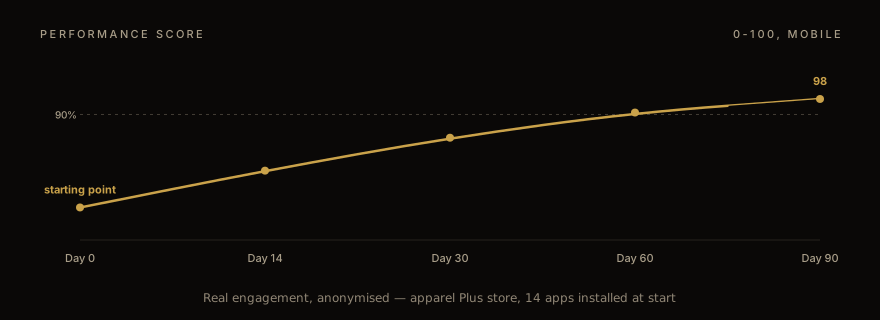
Those are the "good" thresholds. The "needs improvement" buckets are wider, but Google now visibly de-prioritizes pages outside "good" in product carousels and rich-result eligibility (search listings with extras like price and star ratings). We treat 90+ Lighthouse on mobile as the minimum bar for a Plus engagement — anything below 90 is structurally broken — and 95+ as the real goal. 98 is doable on most stores; the last two points cost more than the first thirty did, and they aren't always worth chasing.
The other shift is the metric set itself. INP replaced FID (First Input Delay, which timed only the first tap) in March 2024. INP measures the slowest interaction across the page lifetime, not just the first one. That changes the audit dramatically — the worst INP on a Shopify storefront is usually a click on an add-to-cart button after the third or fourth carousel scroll, when a reviews app's lazy-loaded JavaScript is finally hydrating (starting up) in the background. The first-input fastpath that FID measured doesn't catch this. INP does.
The 80/20 wins
The same five wins compound across most engagements. We start with these every time, in order, because they each unlock the next.
The first is image strategy. Shopify's CDN, the network of servers that delivers files from close to the shopper, supports automatic format negotiation (AVIF for browsers that accept it, WebP for the rest, JPEG fallback) but only if you use the image_url filter with explicit width parameters in your Liquid templates (Liquid is the template language of Shopify themes). Themes built before 2023 often skip this, serving original-resolution JPEGs at 2-3MB each. The fix is mechanical — replace {{ product.featured_image }} with {{ product.featured_image | image_url: width: 1200, format: 'pjpg' }} and let Shopify negotiate. On a typical product page, this drops image weight from 3-4MB to 400-600kB.
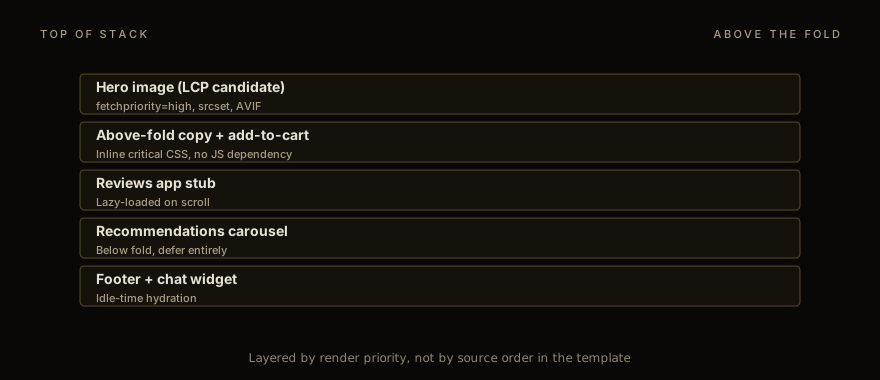
Hero images get an extra layer. The above-the-fold image needs fetchpriority="high", explicit width and height attributes (to reserve layout space and prevent CLS), and a preload hint in the <head>. Below-the-fold images get loading="lazy". The default Dawn theme handles this well; older custom themes often don't, and that's the first ~20 Lighthouse points back.
The second is font subset: cutting fonts down to what the store uses. Shopify themes commonly ship 4-6 font weights from Google Fonts or a custom hosted set, totaling 200-400kB of font files (WOFF2). Most stores use 2-3 of those weights. Subset to what's actually used. Inter at weights 400, 500, 600 — three files — runs about 80kB total. Add font-display: swap so layout doesn't block on font load.
The third is JSON template trim. Shopify's Online Store 2.0 themes use JSON template files, lists of the sections each page shows, that reference sections (the content blocks merchants arrange in the theme editor) by ID. The default Dawn theme stuffs every available section reference into product.json, even sections the merchant doesn't use. Each unused section reference still pulls its CSS and JS at render time. Audit your active templates, remove unused section references. We typically find 5-10 dead sections per template.
The fourth is app-block deferral. Shopify apps install via theme app extensions (the way apps add elements like reviews to a theme) or section blocks. The default install pattern eagerly loads the app's JavaScript on every page, even pages the app doesn't render on. The fix is double-edged — you can't always remove apps the merchant uses, but you can defer them. Wrap the app block in a section that only renders on relevant templates. Move the app's script tag from defer to module + IntersectionObserver-triggered hydration, so the app starts only when its spot scrolls into view. The reviews app stays out of the LCP path entirely.
The fifth is third-party tag audit. Most Plus stores accumulate analytics, marketing, and support scripts over years. Klaviyo. Hotjar. Trustpilot. Optimizely. ZenDesk. Each adds 50-150kB of JS and at least one TLS handshake (a secure-connection setup) to a third-party domain. Audit which ones are actually needed for the current marketing operations. We usually remove 3-5 stale tags per engagement and shift the rest to load via the Shopify pixel system or to fire only on specific events (cart, checkout) rather than globally.
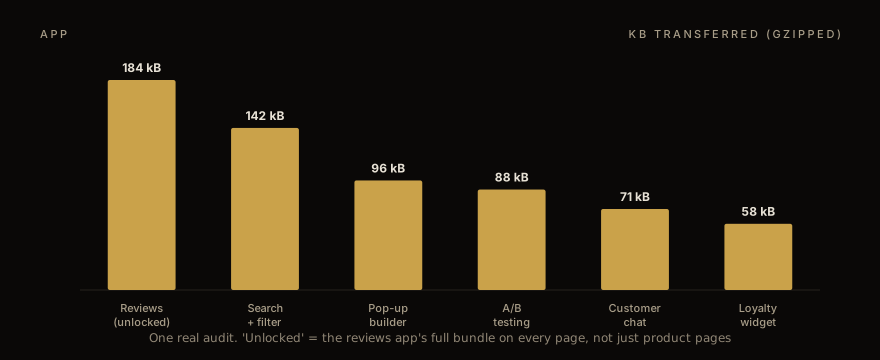
Image pipeline that survives merch changes
The image strategy is the one part of the playbook that breaks most often after launch. The reason is operational, not technical.
A merch team uploads a new homepage hero. They use the Shopify admin's media uploader. The admin compresses the image to ~300kB at the original resolution, then serves it through image_url with whatever the theme requests. So far, fine. But if the theme requests image_url: width: 2000 for a hero that's only ever rendered at 1200px wide on the largest viewport, the merch team has shipped a 2x oversized image. Multiply that across collection covers, blog headers, lookbook tiles, and the Lighthouse score quietly slides 5-8 points over a quarter.
The fix is enforced widths. Every image in the theme should request the maximum width it actually renders at, with the srcset filter generating the smaller variants Shopify will serve to smaller viewports. Like this:
{{ image | image_url: width: 1200, format: 'pjpg' }} for the src, and {{ image | image_srcset: widths: '320, 640, 960, 1200' }} for the srcset attribute. The sizes attribute then declares what width the image actually renders at — usually (min-width: 768px) 50vw, 100vw for a side-by-side hero, or 100vw for a full-bleed.
Featured-image dimensions are the silent culprit. If your product cards render at 400×400px on the storefront but the merchant uploaded the image at 4000×4000, every card on a 50-product collection page transfers a 4000-resolution image even though Shopify is serving 400px through the CDN. The transfer is fine. The decode time isn't. Mobile devices spend 200-400ms decoding 4000-pixel images they're going to display at 400px. Set CSS image-rendering: auto and serve right-sized variants. The decode time goes to ~30ms.
App audit: defer, remove, inline
The app audit is the most political part of the engagement. The merchant pays $30/month for a reviews app and wants reviews on every product page. Removing it is not the move. Deferring it is.
We classify every installed app into one of four buckets. "Critical above the fold" — checkout, cart, currency switcher, search. These render eagerly with their dependencies inline. "Critical below the fold" — reviews on PDP (the product page), recommendations on PDP, related products. These hydrate on viewport intersection or on the first user interaction. "Marketing only" — pop-ups, A/B tests, exit-intent banners. These hydrate on idle or after a 3-5 second delay. "Stale" — apps the merchant hasn't actively used in 90+ days. These get uninstalled, with the merchant's sign-off.
The merchant always pushes back on the "stale" bucket. The pattern that works in those conversations: pull the app's revenue attribution data (most apps have it) and show that the Hotjar install attributed to $0 of revenue in the last quarter. Removing it is then a simple decision.
The "below-the-fold" deferral is technically the most interesting. The naive pattern — add defer to the app's script tag — doesn't always work because the app expects to find its target DOM element when it executes. The robust pattern is to wrap the app's mount point in an IntersectionObserver and inject the script tag only when the mount point enters the viewport. The reviews app at the bottom of a 3000-pixel-tall PDP doesn't load until the user scrolls past the fourth product image.
We use an IntersectionObserver helper, plus a Chrome DevTools (the browser's built-in developer tools) workflow for measuring how long each app delays the page becoming usable, on a real device.
Lighthouse vs CrUX vs RUM: test scores and real-visitor data
Synthetic Lighthouse scores are useful for catching regressions; they aren't ground truth. Three separate signals matter, and they tell you different things.
Lighthouse runs in a clean Chrome instance with throttled network and CPU. It's repeatable and good for CI, the automated checks that run on every code change. But it doesn't reflect real-user device variance. A Lighthouse score of 95 on a M1 MacBook simulating slow 4G can correspond to a real-user P75 LCP of 3.5 seconds on a low-end Android device on actual cellular.
Chrome User Experience Report (CrUX) data is real-user field data, aggregated by Google, exposed via the public API (an interface for software) and surfaced in Search Console and PageSpeed Insights. It's the closest thing to ground truth — it's literally what Google uses to evaluate Core Web Vitals for ranking. The catch: it lags by ~28 days. You can ship a perf improvement and not see it in CrUX for a month.
Real-user monitoring (RUM) — Cloudflare Browser Insights, SpeedCurve, Datadog RUM, or your custom web-vitals library setup — is the fastest signal. You see the impact of a change within hours. RUM data is also the noisiest, since it includes real-user device variance, ad-blocker interference, and bot traffic that has to be filtered. Treat it as the canary, not the verdict.
Our standard setup on a Plus engagement: Lighthouse in CI on every PR, meaning every proposed code change (block merges below 85 mobile), CrUX-based dashboard for monthly review (the official scorecard), and a small custom RUM that posts INP + LCP data to a Cloudflare Worker (a small program on Cloudflare's network) for week-over-week tracking (the early warning).
When Lighthouse and CrUX disagree, trust CrUX. Real users matter more than synthetic scores. When CrUX and RUM disagree — usually because RUM picks up regressions weeks before CrUX — trust RUM and start investigating.
A typical 90-day perf engagement
The shape of an engagement that delivers durable performance gains, not just a one-time score bump:
Week 1-2 is audit and baseline. Pull current CrUX, run Lighthouse on the top 10 page templates, instrument RUM if it isn't already in place, inventory installed apps, and document the merch team's roadmap for the next quarter. The deliverable is a written report with prioritized wins.
Week 3-6 is image and font work. The 80/20 wins. This is where most of the score improvement happens — typically 20-30 Lighthouse points in this window, alone.
Week 7-9 is JavaScript work. App deferral, third-party tag cleanup, theme JS audit. Smaller score gains (5-10 points) but a much larger INP improvement.
Week 10-12 is the long tail. Above-the-fold critical CSS inlining, font subset finalization, edge-case template fixes. The last 5 Lighthouse points and the durability work — instrumenting CI to catch regressions, writing the runbook for the merch team.
Throughout the engagement, weekly checkpoints with the merchant on three numbers: CrUX P75 LCP, CrUX P75 INP, and Lighthouse mobile score on a representative product page. The checkpoint is short — 15 minutes. The merchant sees the trend; the developer team flags any blockers (usually app vendor support tickets or merch team launches that conflict with perf work).
The engagement ends with a documented runbook covering three things: how to run the perf audit script (we hand over the actual CI workflow), how to evaluate a new app proposal against the perf budget, and how to respond when CrUX shows a regression. The runbook is what makes the gains durable.
For the cross-cutting decision of whether to stay on a Liquid theme or move to Hydrogen — sometimes the right perf answer is the platform layer, not the theme layer — see the Hydrogen vs Liquid decision framework. For the conversion-rate-side companion engagement, checkout CRO study covers the eight-store data on what actually moves CVR (conversion rate).
If your Plus store is sitting at 60-80 Lighthouse and the merch team won't stop adding apps, talk to us. We do these engagements on a fixed-scope 90-day basis with a written perf budget signed by both sides. Most stores hit 95+ in 60 days; the third month is the durability layer.
The full engagement scope is on our performance + CRO services page. The two are bundled because — as the checkout CRO study shows — fast pages and high-converting pages are the same problem at different layers of the funnel. We quote each engagement after a short discovery call.
Work with us
Thinking about your next Shopify project?
We build and migrate Shopify stores for brands that care about performance. If this article sparked something, tell us what you’re working on.
Start a conversation