
BigCommerce is a fine platform until you outgrow it. The catalog model is sensible. The API is well-documented. The pricing is published. For merchants doing $5-30M, it works. The pain starts above that.
We have moved nine BigCommerce stores to Shopify Plus in the last three years. The reasons are remarkably consistent — and remarkably different from why people leave Magento or WooCommerce. This is the playbook for the move: what is actually different in the catalog model, how URLs map (and where they don't), the channel-selling consolidation, and what a clean 12-week cutover looks like.
Why merchants leave BigCommerce in 2026
Four reasons come up in every BigCommerce → Shopify Plus discovery call we run.
The first is channel fees. BigCommerce charges a tiered "online sales" fee that scales with revenue — pass certain thresholds and your monthly bill jumps from a flat $400 to $2,000+ even before transaction fees. Shopify Plus has a flat $2,300/month with no revenue gating. For merchants doing $10M+, the math has been net-favourable to Shopify since BigCommerce raised its enterprise tier in 2024.
The second is theme constraints. BigCommerce's Stencil framework is competent but the marketplace is small — fewer than 200 paid themes vs Shopify's 1,500+. Custom theme work is supported but the build tooling lags. We have had clients spend six weeks waiting for a Stencil-compatible designer to be available; the same brief on Shopify finds three qualified builders within a week.
The third is the app ecosystem ceiling. BigCommerce has good apps for the basics — reviews, shipping, returns, search — but the long tail is shallow. Niche use cases (subscription billing with hold/skip, B2B price lists with company-level approval workflows, headless commerce with Hydrogen-style frontend) are well-served on Shopify and require custom builds on BigCommerce.
The fourth is B2B v3 limitations. BigCommerce shipped B2B Edition with company hierarchies, sales reps, quote requests, and net-terms. It works for simple B2B operations. The moment requirements include per-line custom pricing approval, multi-step quote workflows, or integration with an ERP that wants the order in a specific format, the gaps surface. Shopify's B2B (built on the same Plus stack as DTC) handles these natively, including custom checkout fields and per-line approval logic via Functions.
A note on what is NOT a reason: SEO performance. BigCommerce's SEO is fine. Migrations don't fix SEO problems they create new ones, and any merchant pitching "we want to migrate to fix our rankings" is going to be disappointed.
Catalog model differences
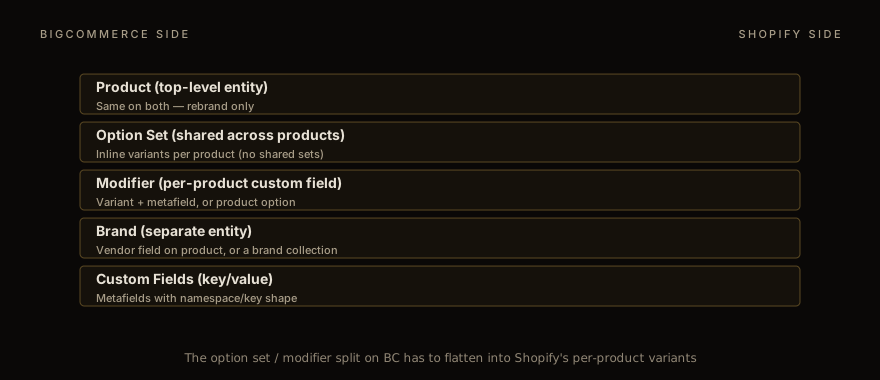
This is the hardest part of a BC → Shopify Plus migration and the most underestimated. BigCommerce and Shopify model products differently in three ways that matter.
First, option sets. BigCommerce lets you define an "option set" once — say, "Size: S, M, L, XL" — and apply it to many products. Update the option set, every product picks up the change. Shopify has no equivalent. Each product carries its own variants. If you have 200 products sharing a "Size + Color" option set with 30 variants apiece, that is 6,000 variant rows on Shopify. That sounds fine until you hit Shopify's 100-variants-per-product limit and have to use the Bulk Operations API.
Second, modifiers vs variants. BigCommerce modifiers are per-product custom inputs (text, dropdown, file upload) that affect the cart but don't create separate SKUs. They map to either a Shopify variant (if they affect price/inventory) or a metafield + line-item property (if they are just data attached to the cart). The conversion is per-product, not programmatic.
Third, brands. BigCommerce has a separate "brand" entity with its own URL space (/brands/nike, /brands/adidas). Shopify has a `vendor` field on products and you can build /collections/nike-handle for the same purpose. The redirect map needs to handle /brands/* → /collections/* explicitly.
We treat catalog modeling as its own discovery phase, separate from migration execution. Two weeks minimum for a 5K-SKU catalog. The output is a CSV — actually, several CSVs, one per Shopify object — that we can import in a known order: products, variants, metafields, then collections, then redirect rules.
The trap nobody flags upfront is custom fields. BigCommerce stores them as key/value pairs on products. Shopify's metafields are also key/value but they require a `namespace` and a typed `definition` to render properly in the admin and on the storefront. Migrating "color_family: Red" from BC to Shopify means: define a metafield namespace (`product_attributes`), define a key (`color_family`) with type `single_line_text_field`, and import the value into the typed metafield. If you skip the definition step, the data lands but doesn't show up in the admin, and your theme can't query it without manual API calls.
URL pattern mapping
BigCommerce has a more relaxed URL grammar than Shopify, which is both good (slugs can be cleaner) and bad (the redirect map has more edge cases).
Out of the box BigCommerce serves products at /products/{slug}/ and categories at /categories/{slug}/. So far so good. But BigCommerce admins can override per-product URL slugs to anything — /the-leather-jacket/ instead of /products/the-leather-jacket/. The override removes the /products/ prefix entirely. We have seen catalogs where 40% of products use this pattern, often inherited from a previous platform migration where someone wanted "cleaner" URLs. Shopify does not allow this — every product lives under /products/{handle}/, no exceptions. The redirect map must handle both prefixed and naked-slug variants.
Category nesting is the other URL gotcha. BigCommerce supports nested categories: /categories/men/jackets/leather/. Shopify does not (collections are flat). The decision: pick the deepest leaf as the destination, redirect all parent paths up the tree to it, and use Shopify's "navigation" feature (separate from collections) to recreate the visual hierarchy. The SEO impact is minor — Google was indexing the leaf URLs anyway.
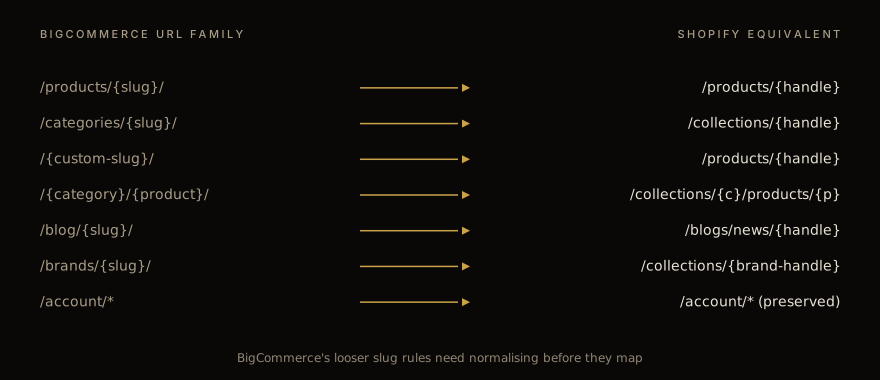
The blog port is straightforward. BigCommerce blog posts at /blog/{slug}/ map cleanly to Shopify /blogs/news/{handle}/. Featured images, body content, comments — all preserved through CSV export, with the exception of any inline shortcodes from the editor (rare on BC, common on WooCommerce).
Account URLs (/account/*) are interesting because Shopify uses the same path convention by default. The challenge is that customer accounts in BigCommerce are stored against numeric IDs in account paths (/account/orders/123456) and Shopify uses opaque strings. If you have customer-facing emails or links pointing at /account/orders/{old-id}, they all 404 post-cutover. The fix: build a temporary lookup endpoint that takes the old ID, finds the imported customer, and 302s to the equivalent Shopify URL. Run it for 90 days post-cutover, then sunset.
Channel selling: multi-storefront → Shopify Markets
BigCommerce's multi-storefront feature is genuinely good. One catalog, multiple storefronts (different domains, currencies, locales, themes), shared inventory, separate checkout. Merchants who use it heavily find the Shopify equivalent — Shopify Markets — to be both more and less.
More, in that Shopify Markets handles currency, locale, payment-method routing, and tax collection automatically once configured, and integrates with Shopify Functions for region-specific logic. Less, in that you cannot have entirely different themes per market on a single Plus store. The same theme renders for every market with locale-specific content blocks. For brands that ran wildly different storefronts on BigCommerce — different product photography, different tone, different category structure — Shopify Markets feels constraining.
The pragmatic call: most BigCommerce multi-storefront setups don't need entirely different themes. The differences are usually currency display, language, and a handful of country-specific products. Shopify Markets handles all of that. If the storefronts genuinely need different themes (different visual brands, fundamentally different category structure), that is the case for multiple Shopify Plus stores rather than one with Markets.
Tax handling deserves a callout. BigCommerce ships with Avalara integration optional; Shopify Plus ships with native tax (Shopify Tax) for the US, EU, UK, Canada, Australia, and several others. The Shopify Tax pricing scales with order volume — fine for $10-50M merchants, expensive above $100M. Run the math before assuming Shopify Tax is automatically the right choice; for high-volume merchants Avalara on Shopify Plus is sometimes cheaper at scale.
Customer + order import
Customer migration has one annoying constraint: passwords don't port. BigCommerce passwords are hashed with bcrypt; Shopify uses its own algorithm; there is no direct migration path. Every customer has to reset their password on first login post-cutover.
The right pattern: import all customers WITHOUT triggering a welcome email or password-reset email. On cutover day, send a one-time mass email explaining the migration ("we have moved to a new platform, please reset your password here"). The reset link comes from Shopify's `/account/recover` flow with a pre-filled email. This produces a 30-50% reset completion rate in week one, which is normal — the rest reset on their first attempted login.
Order history porting is more important than customers realise. Shopify accepts historical orders via the Admin GraphQL API as "orders without billing" — they show up in the customer account and the admin order list, but they don't trigger fulfilment or accounting webhooks. Import them with a custom tag (`migrated-from-bigcommerce`) so you can filter them out of reports. Fee-bearing actions like refunds on these orders need to be handled out-of-band; Shopify will decline to refund a card it never charged.
The third import is product reviews. If BigCommerce was using its native reviews, the data lives in the product_reviews table accessible via the v3 API. Export it, transform it to whatever Shopify reviews app you're standardising on (Judge.me, Yotpo, Stamped, Loox), import on cutover day or shortly after. Hold the reviews import until after the catalog is verified — the review imports reference product handles, and if a handle has changed since you exported, the review attaches to the wrong product or floats in limbo.
Apps that don't port
The app port is where merchants underestimate scope most consistently. BigCommerce has roughly 1,000 apps in its marketplace; Shopify has 8,000+. The mapping is rarely 1:1.
Three categories of friction.
First, apps that have parallel implementations on both platforms but with different feature sets. Shipping calculators (ShipperHQ exists on both, but the Shopify version has more carriers); reviews (Yotpo/Stamped on both, but the data models differ); subscriptions (ReCharge on Shopify is the de facto standard; BigCommerce uses Bold or Rebillia, both with different schemas). Plan a feature-by-feature comparison before assuming "we use X on BigCommerce, we will use X on Shopify."
Second, BigCommerce-native features that don't exist on Shopify out of the box. The brand entity (mentioned above). Customer groups with native price overrides (Shopify has B2B with price lists, but the model differs). The "complex shipping" rule engine that BigCommerce ships natively (Shopify uses Shipping Functions or third-party apps).
Third, custom integrations. Most BigCommerce stores doing >$5M have at least one custom integration: ERP sync, marketplace feeds (Amazon, Walmart, eBay), 3PL handoff, custom CRM. None of these port automatically. Each is its own re-build on the Shopify side, typically 2-6 weeks of dev work depending on complexity. Budget for it from day one.
The pragmatic discovery question we ask in week one: "List every BigCommerce app you currently pay for, plus every custom integration that touches the BigCommerce API." The list is always longer than the merchant remembers. Walking through it line by line — keep / replace / drop — sets the realistic scope of the migration.
SEO + cutover
The SEO playbook for BigCommerce → Shopify is structurally similar to Magento or WooCommerce. The redirect map is the spine. Submit the new sitemap on cutover day. Watch GSC daily for the first two weeks, weekly for weeks three through six. Expect a 30-50% impressions trough in week one and a near-full recovery by week four if the redirect map is correct.
The BigCommerce-specific quirks: brand URLs (/brands/*) need explicit redirects to Shopify collections; naked-slug product URLs need explicit redirects (BigCommerce admins love them, Shopify doesn't allow them). Category nesting flattening means /categories/men/jackets/leather/ → /collections/leather-jackets, with /categories/men and /categories/men/jackets either redirecting to a parent collection or 410ing if they were thin.
The other BC-specific habit: review your structured data carefully. BigCommerce themes vary widely in what schema they emit; some emit Product + AggregateRating cleanly, some don't emit AggregateRating at all, some emit duplicate Product schema (one from the theme, one from a "rich snippets" app the merchant added years ago). The migration is a forcing function to clean this up. We always validate the new Shopify schema with the Rich Results Test on a representative product sample before cutover.
For a deeper field manual on the SEO side specifically, WooCommerce SEO guide covers the same territory with a different platform's quirks — the GSC monitoring playbook applies cleanly to BigCommerce too.
Timeline + budget
A clean BC → Shopify Plus migration for a 5K-15K SKU catalog runs 12 weeks. Larger catalogs (50K+) push to 16-20 weeks. The phases:
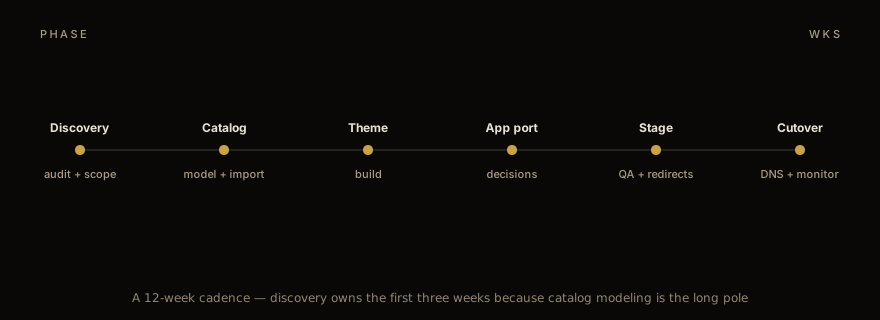
Discovery is three weeks. Catalog model walkthrough, URL audit, app inventory, custom integration scoping. The deliverable is a written migration spec the merchant signs off on before any code gets written.
Catalog import is two weeks. CSV preparation, dry-run imports to a development store, validation pass. The imports themselves take hours; the prep takes weeks.
Theme rebuild is three weeks for a "modern but not bespoke" theme — Dawn-based, with the merchant's brand applied. Custom themes (truly bespoke design + interactions) push to 6-8 weeks and shift the critical path.
App port and custom integration is two weeks running in parallel with the theme. Some apps install in an hour; the long tail (custom ERP sync, marketplace feeds) eats most of the time.
Staging + QA is one week. The merchant logs in to a development store, validates the catalog, runs test orders, signs off on the redirect map.
Cutover is the day itself plus a week of monitoring. Monday morning DNS flip, weekly GSC reviews for six weeks. Final sign-off when the impression curve recovers.
For a budget reference: a typical Plus migration in this scope runs $80-150K depending on catalog complexity, theme work, and the custom integration count. Larger catalogs and bespoke design push to $200-400K. The Shopify Plus license itself is $2,300/month plus transaction fees, with discounts available at higher GMV tiers.
The biggest cost-saving lever is honest scope. Merchants who try to combine "migrate from BigCommerce" with "redesign the brand" with "implement the new B2B portal we have been talking about" end up with a 9-month project that should have been a 3-month migration followed by two follow-on projects. Sequencing matters. Migrate first, then rebuild on the new foundation. We push back on combined scope every time.
If you are evaluating a BigCommerce → Shopify Plus move and want a real estimate against your catalog and your app stack, talk to us . We will do the discovery walk-through and tell you what the cutover actually costs. For the cross-platform context, Magento → Shopify Plus playbook covers the same migration mechanics from a different starting platform, and the migration services overview is the end-to-end view of what an engagement looks like.
Work with us
Thinking about your next Shopify project?
We build and migrate Shopify stores for brands that care about performance. If this article sparked something, tell us what you’re working on.
Start a conversation